Order Agent
Turn incoming customer orders into validated sales orders in Business Central
Order Agent reduces the manual work required to turn incoming customer orders into sales orders, reducing errors and shortening processing times. Your team can spend their time on customers instead of administration.
Bring incoming customer orders into one clear workflow and let more of them become sales orders without manual handling in Microsoft Dynamics 365 Business Central.
What you get with Order Agent
Many channels, one workplace – Orders arrive in different ways. You manage them in one place. PDFs are read by AI, while Peppol, E-Order, EDI and Excel can join the same flow.
Smart matching – Customers are identified by registration or VAT number, email, name or address. Items are matched by item number, GTIN or description. Customer-specific references are remembered and reused for future orders.
Validation before creation – See each order next to its extracted data, with matched and unmatched information clearly marked. Checking is quick, and mistakes are caught before they become sales orders.
Better over time – Every customer-specific reference you create raises the automation level. More orders go through without manual handling, and your order desk grows without the admin growing with it.

Your safety net
Automation shouldn’t mean crossing your fingers. Orders are validated against your business rules before they become sales orders in Business Central. If something doesn’t add up, the order waits in the workspace until someone has looked at it. If everything is correct, the sales order is created without anyone having to touch it.

Up and running in no time
Order Agent is built for self-service. Your Business Central partner and our team are there if you need a hand.
Download
Install Order Agent from Microsoft Marketplace. It works with both the Essential and Premium editions of Business Central.
Set it up
Connect your order sources and define the business rules that decide which orders can go straight through.
Review and grow
Check the first orders, create references where needed, and see the level of touchless order processing increase over time.
No design workshop. No go-live date. No hyper-care. Unless you want it.

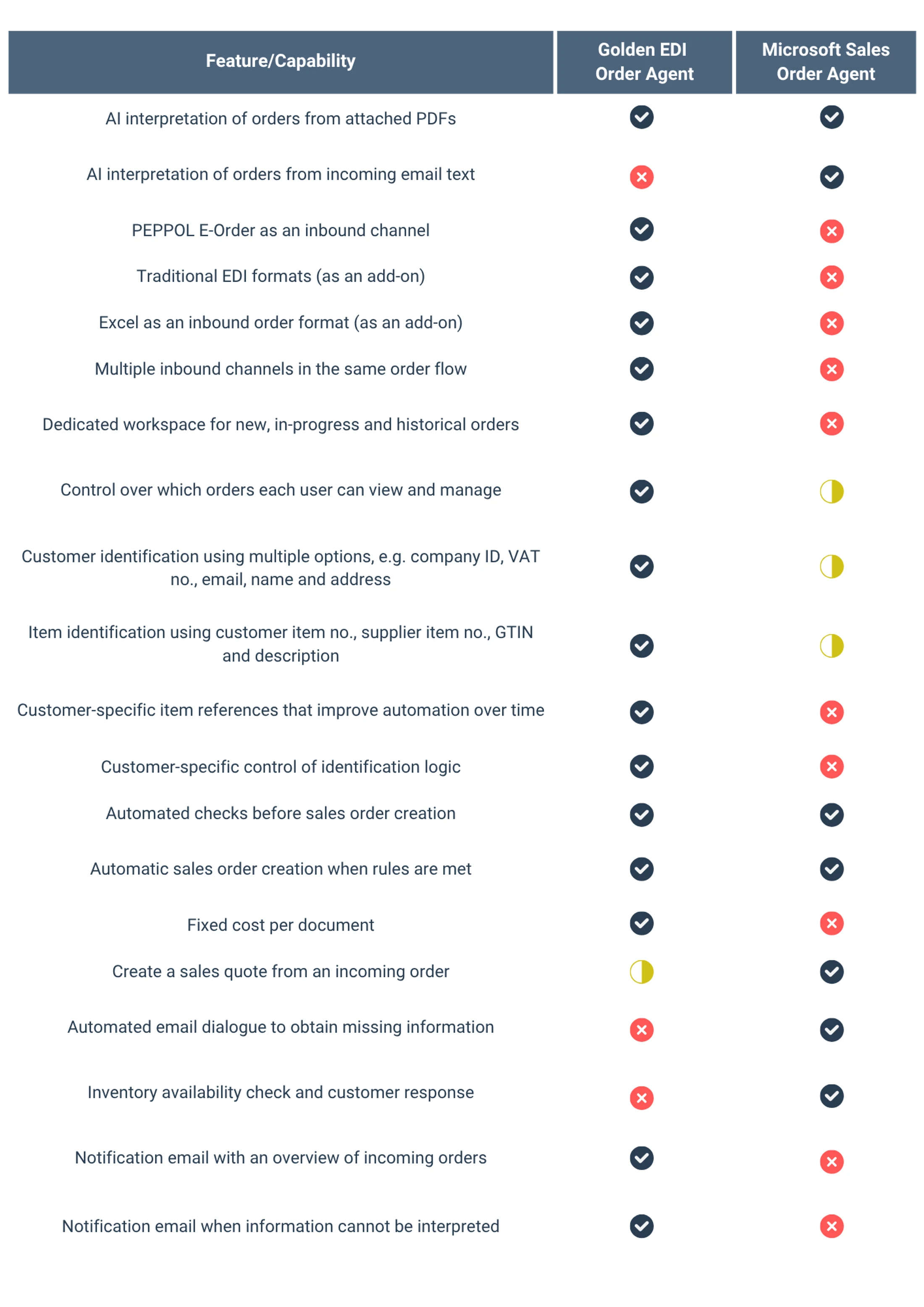
Golden EDI Order Agent vs. Business Central Sales Order Agent
Two approaches to automated order entry, with different scope and focus.
Questions & answers
What is Order Agent?
An app for Business Central that handles the step between a customer’s order and your sales order.
Who is it for?
Teams where the bottleneck is capturing orders, not receiving them. It’s an especially good fit when orders arrive through several channels and formats, or when a full EDI solution isn’t practical yet.
Where does AI come in?
AI is used to extract information from unstructured customer orders such as PDFs. Order Agent then matches the information against Business Central data and validates the order using your business rules.
Do my customers have to change how they send orders?
No. They keep sending orders the way they do today.
What happens if an order doesn’t pass validation?
It stays in the workspace, flagged as an exception. No sales order is created until someone has checked it.
Do we need an implementation project?
No. Order Agent is designed to be installed and managed by your own team. If you’d like support, talk to your BC partner or us.